Top picks
The Best Laptop Locks
 By Erin Maloney
 Reviewed by Officer James Banta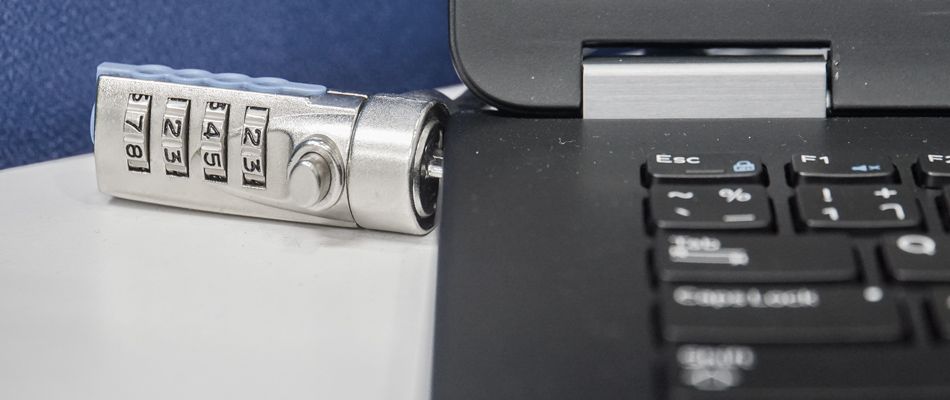
The Best Laptop Locks
Whether you’re working from home, a coffee shop or a classroom, laptop locks are a must-have if you want to secure your equipment from thieves. Now, more than ever, employees are working remotely, and laptop locks are a simple way to make sure no one gets a hold of your information, or steals your equipment, no matter where your workday takes you.
But not all locks are made the same. The best laptop locks are the ones that fit your budget, security needs and specific equipment. Here we break down the best laptop locks on the market today.
1. Best Overall: Kensington Locking Station
This is one of the best laptop locks on the market thanks to its design that’s able to fit so many different types of laptops. Apple products don’t have built-in lock slots, and this product is able to be used with just about any laptop between 11 and 15 inches.
Users also appreciate how this Kensington lock allows for flexibility in using your laptop. You can rotate and tilt your computer as needed without having to worry about the lock. You also don’t have to make any additional modifications to your computer with the way this lock is manufactured.
Pros
Compatibility — This is one of the best laptop locks simply because it can be used with so many types of products. Apple laptops don’t come with a lock slot, and this lock can be used whether your computer has that slot built-in or not.
Price — While there certainly are more affordable locks, this one provides users with ample security and flexibility at a fair price.
Multiple lock choices — Choose from a key, electronic or combination lock depending on how you prefer to lock your laptop.
Cons
Sizing — This product works with 11- to 15-inch laptops, so if you have something smaller, or larger than that, it won’t work properly.
Cannot close with lock in place — While this may not be an issue for some, it certainly is a big sticking point for certain users. Your laptop will not be able to fully close while the lock is on.
2. Best All-in-one: Kensington Locking Kit
While this lock is marketed for a desktop, it can certainly be used for laptops as well. This is one of the best laptop locks when you’re looking to keep all computer products on your desk secure. This lock keeps all of the individual items together and locked while on your work space.
This lock will work with anything from desktops and laptops to monitors, hard drives, projectors and televisions. We also like this product because it can be used on devices without a lock slot, including Apple products.
Pros
Versatility — This is one of the best laptop locks for people looking to secure multiple items in one work space. From your computer to mouse, keyboard, monitors and anything else you utilize to work, this product can keep your equipment together and safe.
Price — At around $30, this is a great price point for such a versatile product that is compatible with multiple items.
Durability — We like the fact that this lock has not only a tamper-resistant lock, but also an 8-foot cable that is cut-resistant. It’s manufactured with woven carbon steel along with a protective sleeve that not only makes it last longer, but means it’s tougher for thieves to cut, too.
Cons
No Noble lock slot — It’s important to run down the list of compatible equipment before purchasing this lock because it doesn’t work with a Noble lock slot. That means some Dell, Latitude, Venue, XPS and Chromebook 13 models don’t work with this product.
Adhesive issues — While this didn’t seem to be a widespread issue due to its high Amazon rating, some customers noted the adhesive provided for the anchor plate doesn’t last very long.
3. Bargain Pick: The I3C Laptop Lock
When you’re on the hunt for the best laptop locks, but you don’t have the extra cash, the I3C Laptop Lock is a great choice to save money without sacrificing value. This item works not only for laptops, but also for tablets. It can be used for devices with and without the lock slot built-in, which is another reason why this is such a great purchase. The lock head can be rotated, which helps with usability, but it’s also theft-resistant with a 6.5-foot cable, making it great for everyday use. It also comes with two keys to lock and unlock as needed.
Pros
Compatibility — This is one of the best laptop locks because you don’t have to worry as much about the type of laptop you have. This lock is compatible with laptops with and without a built-in lock slot.
Price — This is one of the most affordable options on the market today. You’ll get great protection at a fraction of the price of other computer locks.
Durability — The cable is manufactured with cut-resistant twisted steel with a PVC coat, making it not only tough to break from wear and tear, but also difficult for thieves to cut.
Cons
Cable length — While we think a 6.5-foot cable is long enough for comfortable use, some customers wish it was longer in order to provide more flexibility and ease of use.
Adhesive issues — Some customers were simply not impressed with the adhesive provided, and wanted to reinforce the adhesive plate for extra security.
4. Built-in Lock Slots: Kensington Combination Cable Lock
If you have a device with a built-in Kensington lock slot, this is one of the best laptop locks you can buy. It’s compatible with laptops from HP, Lenovo, Acer, Asus and more. This lock can also attach to televisions, hard drives and docking stations for a complete security setup, as long as the product comes with a built-in security slot.
The combination is resettable, and it comes with a four-number combination with a possibility of 10,000 codes. The push-button design makes it easy to attach and detach as needed. The carbon steel cable provides another piece of security, making it even tougher for thieves.
Pros
Durability — This is one of the best laptop locks when it comes to durability, thanks to the strong carbon steel cable that comes with the product. You don’t have to worry about everyday wear and tear when it’s made for it.
Code retrieval program — So much for forgetting your combination. Kensington has an online retrieval program where you can register your lock. If you forget, you can just go online and look up your combination.
Versatility — You can utilize this lock not only with laptops, but also televisions, monitors, hard drives and anything that has a built-in Kensington lock slot.
Cons
Compatibility — If you have an Apple device, this is not the product you should purchase to keep your laptop safe. This is only compatible with devices that come with the Kensington lock slots built-in, which Apple does not have.
Lock issues — From setup issues to changing the combination, the main concern from customers in online reviews comes from the combination lock. Some people say it’s difficult to use, while others say the lock is simply difficult to set.
5. Best Combination Lock: Sendt Combo Lock
The Sendt Notebook and Laptop Combination lock is one of the best laptop locks if you’re looking for a solid combination lock. Many users complain that with other combination locks, the code is too easy for thieves to reset. Not with this product, as you’ll need a small flathead screwdriver to set it up. The 6-foot cable is long enough to be able to use your devices freely, and you even get to pick out your own color, which is a rarity with computer locks. However, it’s important to point out this item will not work on Dell laptops or Apples that do not have a Kensington lock slot built-in.
Pros
Price — For the price you pay, you get quite a value with the Sendt combination lock. It provides you with a sturdy combination lock with a durable cord around a $15 price point.
Color options — We like that you can pick from a few different color options, because sometimes you may not want a boring black lock.
Combination locks — Users rave about this combination lock because it’s not very easy to reset. That may sound like a bad thing, but you have to use a small screwdriver to set the combination, and customers say that gives them added peace of mind.
Cons
Compatibility — This product is compatible with devices that have the Kensington lock slots built in, which means you won’t be able to use it with items that don’t have that feature. It’s important to check to see if your laptop has one before purchasing. This does not work with Dell or Apple products.
Cable issue — Although the cable is strong, some customers say it’s annoying to store because it straightens out on its own. Users recommend finding a Velcro strap to coil it yourself if you plan on traveling or storing it in a computer bag.
Things to consider before buying a laptop lock
- Locking mechanism: Laptop locks come in different shapes and sizes, with differing locking mechanisms. Some have an electronic or combination lock, while others have a keyed lock. Choose the lock that best suits the level of security you’re looking for, along with what suits your personal tastes. For instance, if you tend to lose keys, a combination or electronic lock may be a better choice.
- Cord strength: The best laptop locks have durable cords. After all, it would be very easy for a thief to stroll right up and cut the cord and steal a laptop. Look for anti-theft cords that are difficult to cut made from a strong product.
- Weight: Most of the laptop locks you’ll find are incredibly lightweight and easy to carry. There are some options that are heavier, but they also may be made for different uses, such as securing more than one piece of equipment. If you’re a traveler, or constantly working in different places, finding a lightweight lock is a must.
- Design and features: When deciding on a laptop lock, it’s important to find one with a design that fits your specific equipment. For example, make sure you look for a lock that is compatible with a Kensington lock slot if your computer has one. If not, there are different ways to affix your lock to your device. You also may want a lock with rotation if you tend to walk around or move with your laptop a lot. Keep an eye out for the type of design that works best for your everyday use.
- Ease of installation: Most laptop locks with a Kensington lock slot will be pretty simple to install. Keep in mind, many computers do not have a lock slot, so there may be different ways to install the lock, such as an adhesive. Most installations are pretty simple, but every now and then you may need a tool to set a combination lock to get things up and running.
Final thoughts on laptop locks
Whether you’re in a coffee shop, at the office or on the go, the best laptop locks will deter thieves from your belongings and give you peace of mind. These products are a relatively inexpensive way to help ensure your expensive equipment stays safe. When looking for the best laptop locks for you, remember to make sure you first look to see if the lock is compatible with your device. If the laptop is for a child - you may also want to check out our picks for the best parental control apps as well.